Core Data does automatic schema migration for certain schema changes which are simple and straightforward. For other scenarios we will have to do manual schema migration. In this post we will see how to perform manual schema migration. I will demonstrate this taking example of the schema migration I had done for my app API Tester Pro (API Zen).
In the first version of the model I have two properties in the EWorkspace entity. One is syncDisabled which is a date field and another is isSyncEnabled which is boolean. We are not setting any default value in the first model version, but we need to change that and have default values. So we are performing data migration to have these default values set for existing data.
1. Add new version for the model file
1.1 Let's say current model is at v1 and we are upgrading it to v2.
1.2 Open .xcdatamodeld.
1.3 Editor > Add Model Version....
1.4 Name it say, APITesterPro 2.
1.5 Set APITesterPro 2 as the current version.
2. Add mapping model
2.1 For older version of Xcode, select the .xcdatamodeld, Editor > Add Mapping Model... and for newer versions choose File > New > File from Template > Mapping Model.
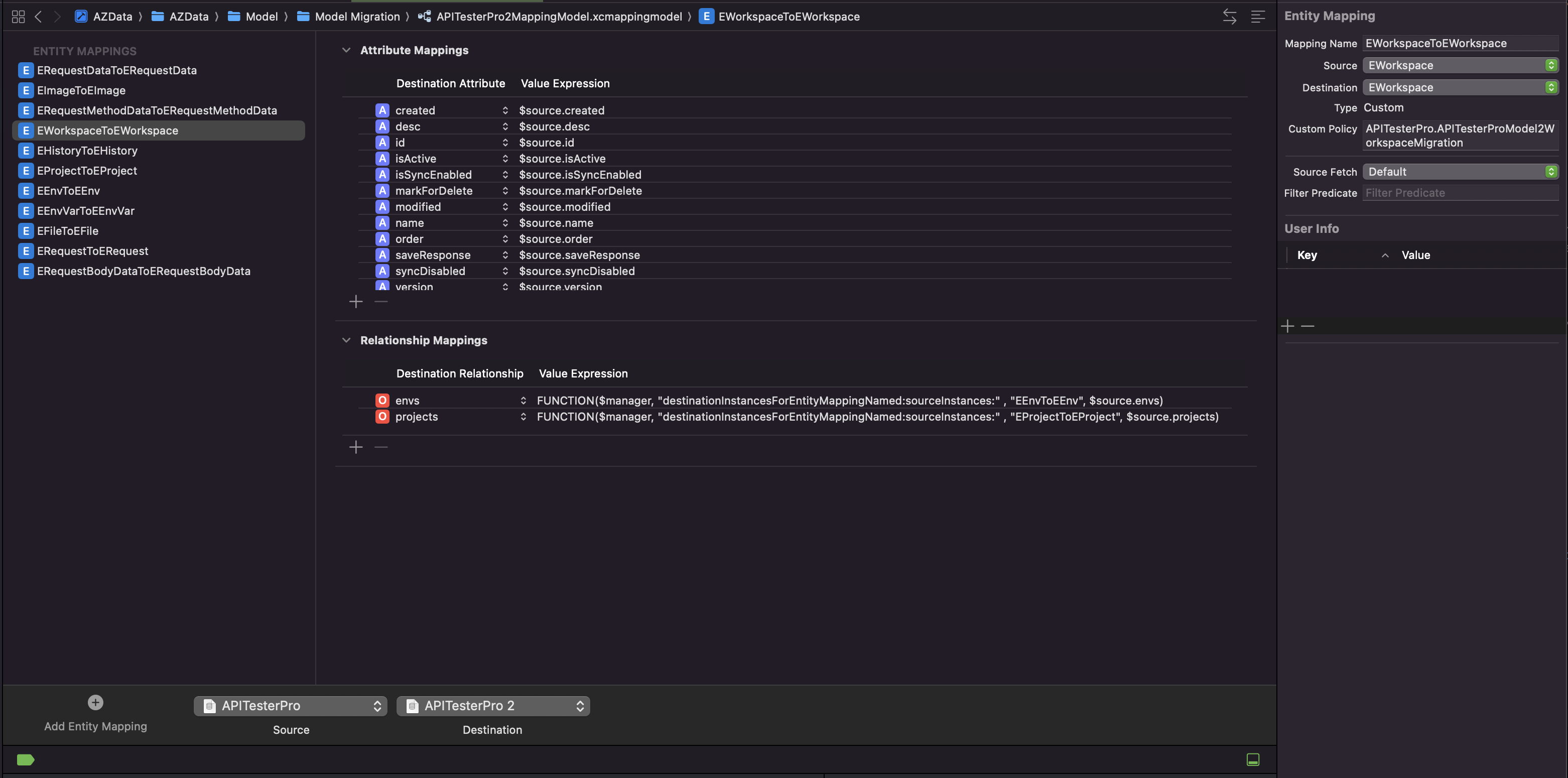
2.2 Select source as APITesterPro and destination as APITesterPro 2.
2.3 Xcode creates a .xcmappingmodel file. Place this under a model folder for better organization. This mapping model instructs Core Data that there needs to be data migration done for the model version upgrade.
2.4 In the mapping model, select the entity which we want to upgrade which is EWorkspace.
2.5 Make sure in the Inspector, it shows Copy for Type in new versions of Xcode (26.1.1) and older version it is Custom.
2.6 Create a custom policy file APITesterProModel2WorkspaceMigration and place it under the same model folder.
2.7 Add APITesterPro.APITesterProModel2WorkspaceMigration under Custom Policy in the EWorkspaceToEWorkspace entity mapping which instructs to Core Data that when doing model migration for EWorkspace, run this custom policy file which hold model changes.
import Foundation
import CoreData
import AZCommon

class APITesterProModel2WorkspaceMigration: NSEntityMigrationPolicy {
    private let dataUtils = AZDataUtils.shared
    private lazy var db = { CoreDataService.shared }()
    private let nc = NotificationCenter.default

    override func createDestinationInstances(forSource sInstance: NSManagedObject, in mapping: NSEntityMapping, manager: NSMigrationManager) throws {
        Log.debug("cd: model migration from v1 to v2")
        if (sInstance.entity.name == "EWorkspace") {
            // Since we are creating new object, we need to copy all properties from the source to the new destination object manually.
            // If we want to instead update only one property we can also use the FUNCTION in the attribute mapping in the mapping file.
            var dInstance = NSEntityDescription.insertNewObject(forEntityName: mapping.destinationEntityName!, into: manager.destinationContext)
            if sInstance.value(forKey: "syncDisabled") == nil {
                sInstance.setValue(Date(), forKey: "syncDisabled")
            }
            dInstance = dataUtils.copyAttributeValues(src: sInstance, dest: dInstance)
            // migrating this to value set as false
            dInstance.setValue(false, forKey: "isSyncEnabled")
            Log.debug("cd: model migration workspace: set isSyncEnabled to false for \(String(describing: sInstance.value(forKey: "name")))")
            self.nc.post(name: .clearCurrentWorkspace, object: self)
            self.dataUtils.saveSelectedWorkspaceId(self.db.defaultWorkspaceId)
            self.dataUtils.saveSelectedWorkspaceContainer(.local)
            self.nc.post(name: .workspaceDidSync, object: self)
            manager.associate(sourceInstance: sInstance, withDestinationInstance: dInstance, for: mapping)
        } else {
            Log.debug("cd: model migration: no custom change")
            try super.createDestinationInstances(forSource: sInstance, in: mapping, manager: manager)
        }
    }
}
With this, when the app launches for the first time after downloading the updated version, it will do model upgrade and run through this schema migration which will set default values for existing data. For newer data, setting default values needs to be handled separately. And this migration will run only once and we don't have to track if it has run or not because that's done by Core Data.